Nortiqo Upgrade Know what an upgrade breaks, before it is done.
For partners: see which of a customer’s customizations the new release breaks, which need a test and which are safe, with nothing upgraded yet. Then work through the findings as the upgrade’s task list.
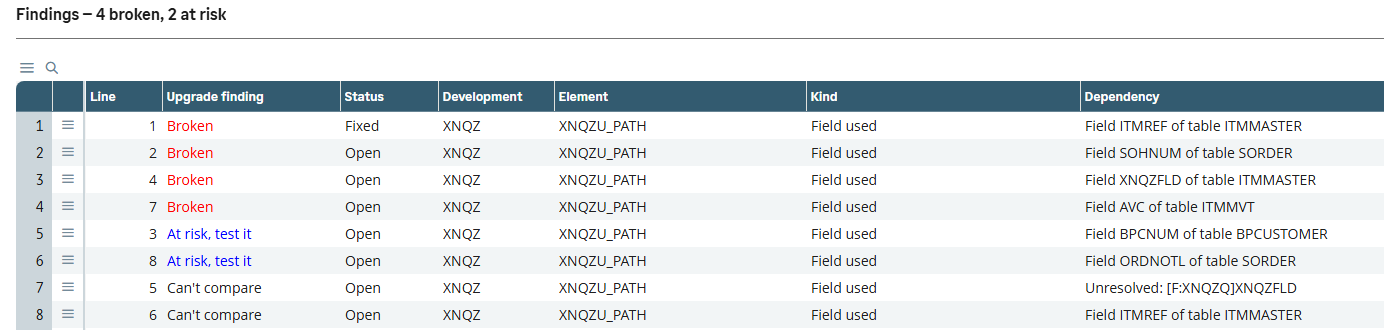
Upgrade findings. Broken lines first, each with its status and what it relies on.
In Sage X3 · our test dataThe risk of an upgrade is in the customizations
Sage’s release notes say what changed in Sage. They cannot say what that breaks in one customer’s own code. Nortiqo Upgrade compares every customization’s dependencies with the new release before anything is upgraded, and turns the result into the upgrade’s task list.
How it works
- 01
Collect
In the customer’s folder, the collector takes an inventory of the customizations and writes a fingerprint file.
- 02
Compare
In a reference folder at the new release, the fingerprint is imported and every dependency compared.
- 03
Work
Each finding is Broken, At risk, Unaffected or Can’t compare, and takes a status as the work goes on.
- 04
Confirm
After the test upgrade, a second run confirms the work line by line.
Each dependency is judged
- Broken
- At risk
- Unaffected
- Can’t compare
A readiness score from 0 to 100 against Sage’s update-ready rules, with every point behind it listed. It reads Sage’s elements and never changes them.
In X3
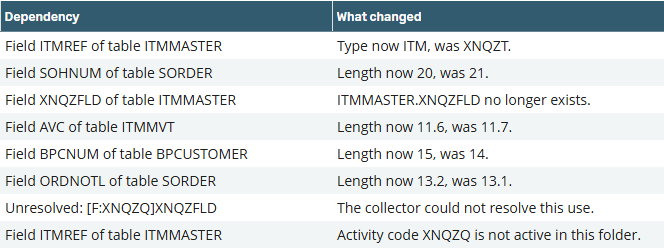
What changed. For each dependency, what changed in the new release.
In Sage X3 · our test dataWho it is for
The partner’s project lead
The scope of an upgrade from its findings, before the quote: what breaks, what needs a test, what is safe.
Developers
Broken lines first, each with what it relies on, what changed and where to test it.
The customer
A report of what was checked, fixed and confirmed, to keep with the upgrade.
What it does
- 01An inventory of the folder’s customizations, by activity code, and of everything each relies on in Sage.
- 02A readiness score from 0 to 100 against Sage’s update-ready rules, with every point behind it listed.
- 03A fingerprint file of facts, never code, taken to a reference folder at the new release.
- 04Each dependency judged Broken, At risk, Unaffected or Can’t compare.
- 05The findings are the task list: a status on every line, with who set it and when, and a report to open in Excel.
- 06After the test upgrade, a second run confirms the work line by line.
- 07It reads Sage’s elements and never changes them.
What it needs
- A customer at 2025 R2, upgrading to 2026 R1.
- A reference folder at 2026 R1, with the same modules and legislations as the customer’s.
Not in the first version
- Only an upgrade from the release just before the target; V11 is not supported.
- A change to Sage’s logic that changes no dictionary element, routine or compiled file goes unseen; the customer’s own tests must find it.
Questions
Does the customer’s code leave the folder?
No. The fingerprint holds facts about the customizations and the Sage elements they rely on, never code.
Does it decompile Sage’s scripts?
No. A compiled script is compared by its checksum alone.
Which releases does it cover?
An upgrade from 2025 R2 to 2026 R1, the release just before the target to the latest.
Does it replace testing?
No. It finds what the dictionary, routines and compiled files show. A change in Sage’s logic alone is for the customer’s own tests to find.
The other add-ons
- XNQEE-signatureSignatures and approvals on the changes that matter in X3, each sealed in a register that shows any tampering.
- XNQLLabelsPrint labels from the document you are in, with barcodes checked before they print and every print logged.
- XNQDData HealthEvery night, 22 checks of your X3 data, each finding with its owner and the function where it is fixed.
- XNQIE-invoicingEvery posted customer invoice leaves X3 as a checked PEPPOL invoice, with its PDF inside.
See how it works in X3.
A 30-minute demo in our X3, in Swedish or English.
Book a demo