Nortiqo E-signature Sign and approve changes in X3.
Policies decide which changes in X3 need a signature, from supplier bank details and credit limits to bills of material and batch release. Approvers sign in X3, and every signature is sealed in a register that shows any tampering.
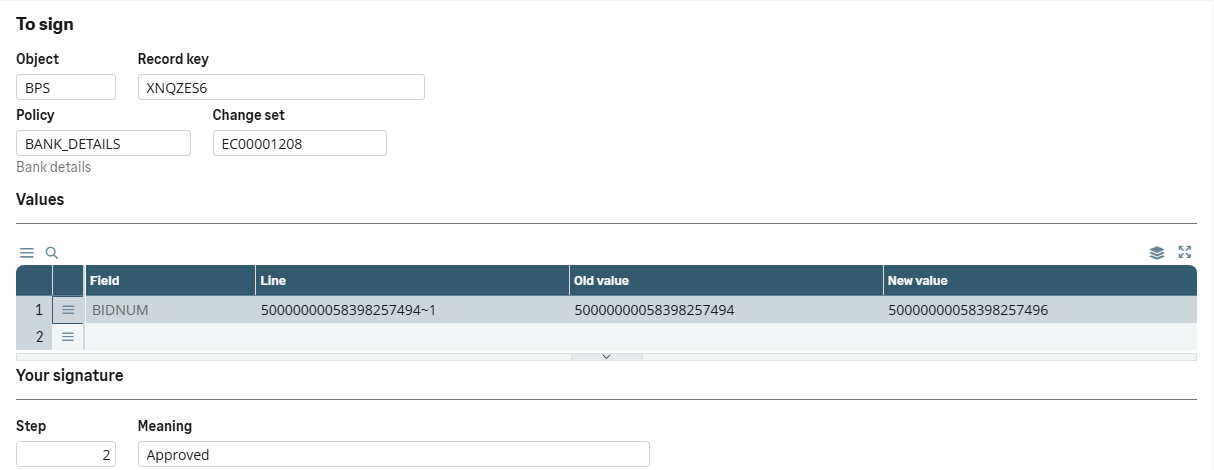
The signing dialog. The approver sees the old and new values, the step and its meaning, then signs with their own code.
In Sage X3 · our test dataA change that matters carries a signature
Supplier bank details, a credit limit, a released batch: in X3 one user with the rights can change them alone, and the record says little about why. Nortiqo E-signature asks for the right signatures before such a change takes effect, and keeps a register that shows whether anything changed without one.
How it works
- 01
Change
A user changes a record a policy governs, such as a supplier’s bank account.
- 02
Sign
The policy asks for a signature at save, or turns the change into a request that waits for its approvers.
- 03
Approve
Approvers sign or reject in their inbox. An approved change is applied through Sage’s own import, so Sage’s checks run again.
- 04
Prove
Each signature is sealed in the register, and the integrity monitor checks it against X3’s audit trail every day.
Fifteen ready-made policies, switched on as shipped
- Supplier bank details
- Customer credit limits
- A new customer’s activation
- A journal entry’s finalisation
- Price lists
- A product-site’s suppliers
- Bills of material
- Routings
- Products’ specifications
- Batch release
- Lot status
- Lot characteristics changes
- Miscellaneous issues
- Miscellaneous receipts
- Intersite transfers
For life science: a Regulated switch for FDA 21 CFR Part 11 and EU GMP Annex 11, and a validation pack.
In X3
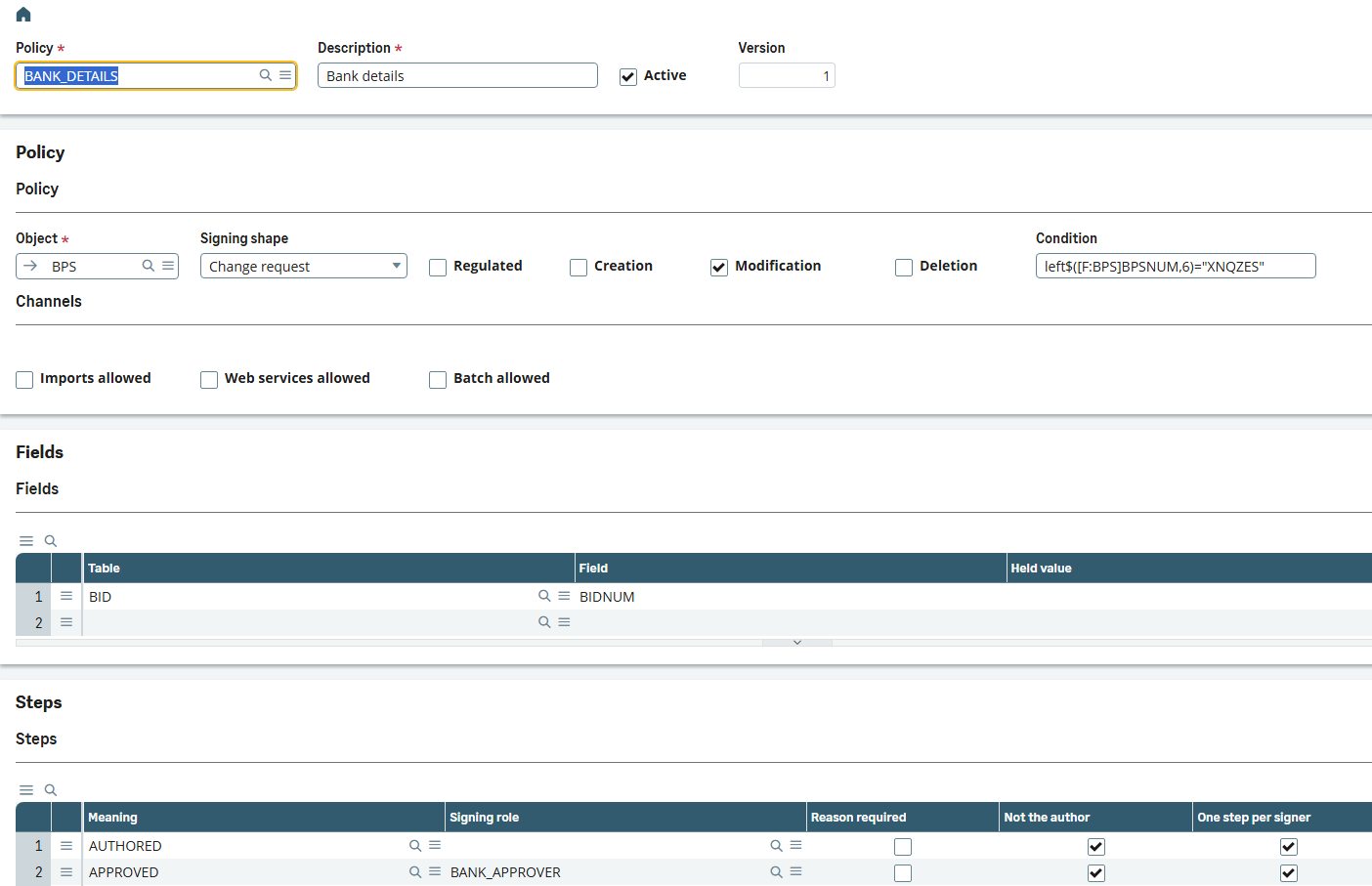
A signature policy. Set up without code: the object, the events, the fields it holds and its steps in order.
In Sage X3 · our test dataWho it is for
Finance and internal control
Four eyes on bank details, credit limits, new customers and journal entries, set up as policies.
Quality, in life science
Signatures with a meaning on master data and batch release, a register ready for inspection, and a validation pack.
Administrators
Policies, signing roles and an integrity monitor in X3, without code, moved from test to production.
What it does
- 01Signature policies, set up without code: the object, the events, the fields and the signature steps in order. Fifteen ship ready, from supplier bank details and credit limits to batch release and price lists.
- 02Sign at save, or a change request that saves nothing until every approver has signed and then applies the change through Sage’s own import.
- 03The signer sees the old and new values, the step and its meaning before signing with their user code and signing code.
- 04Signing roles with dated grants, and steps that exclude the change’s author.
- 05An inbox for approvers, with deputies, reminders and escalation.
- 06A register whose entries are only ever added, each sealed with the company’s certificate and chained to the one before.
- 07An integrity monitor that reads the register beside X3’s audit trail every day and lists any change no signature explains.
- 08For life science: a Regulated switch for FDA 21 CFR Part 11 and EU GMP Annex 11, and a validation pack.
What it needs
- Sage X3 V12, 2025 R2 or 2026 R1.
- A certificate in Syracuse to seal the register, the batch server, and X3’s audit on the tables a policy governs.
Not in the first version
- Signers sign with their X3 user and signing code; BankID and the like are not offered.
- Only the customer’s own X3 users sign.
- Signature history from an earlier e-signature add-on is not taken over.
Questions
Can we try a policy without stopping anyone?
Yes. In observe mode a policy records what it would have asked for, and stops no one.
What about imports, web services and batch?
They never sign. Each policy says, per channel, whether such a change is refused, let through and recorded as unsigned, or turned into a change request.
Does it support BankID?
Not in the first version. Signers sign with their X3 user code and a signing code.
Is it validated for 21 CFR Part 11?
Validation is the regulated customer’s own duty. The product’s Regulated switch keeps the setup within what the regulations require, and its validation pack traces the regulations to the features, with test scripts and templates.
The other add-ons
- XNQLLabelsPrint labels from the document you are in, with barcodes checked before they print and every print logged.
- XNQDData HealthEvery night, 22 checks of your X3 data, each finding with its owner and the function where it is fixed.
- XNQIE-invoicingEvery posted customer invoice leaves X3 as a checked PEPPOL invoice, with its PDF inside.
- XNQUUpgradeWhich of a customer’s customizations the next release breaks, before anything is upgraded.
See how it works in X3.
A 30-minute demo in our X3, in Swedish or English.
Book a demo