Nortiqo Labels Label printing, set up in X3.
Set up labels, data and printers in X3. Users print from the document they are in, see the rows before they print, and reprint any label from the job log.
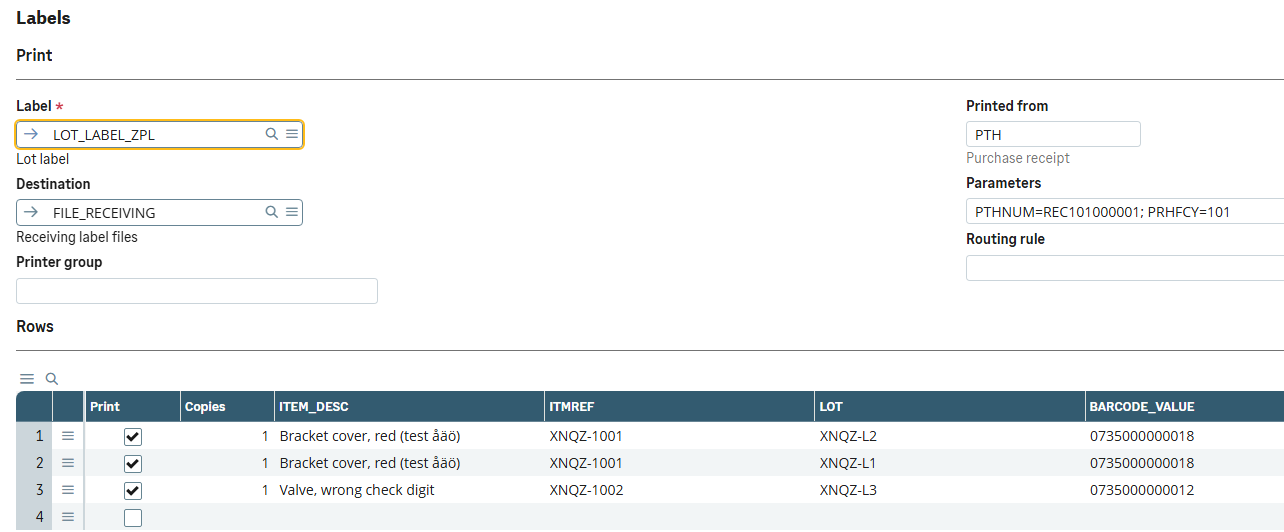
Label printing from a purchase receipt. Opened from the receipt: the label, its destination, and the rows and copies to print.
In Sage X3 · our test dataLabels without waiting for a developer
Label printing in X3 is often built as code for each customer, so a new label, printer or document waits for a developer. Nortiqo Labels puts the whole setup in X3’s own functions: a consultant changes what prints and where, and users print from the document they already have open.
How it works
- 01
Set up
A label is a ZPL template with tags, each filled from a field, a constant or an expression. A ready setup ships to copy.
- 02
Print
From the menu Nortiqo Labels on the document: the labels that apply, a tick and copies on each row, the destination.
- 03
Check
Barcode data and check digits are checked and values escaped before anything prints.
- 04
Log
Every print is logged line by line, and a reprint sends the label exactly as it was printed.
Prints from
- Purchase receipts
- Production tracking
- Quality control
- Work orders
- Deliveries
- Stock changes
- Lot renumbering
- Lot characteristics changes
Through BarTender Cloud, a BarTender server, or as files for your own printer queue. Set up in X3 without code, with a ready setup to copy.
In X3
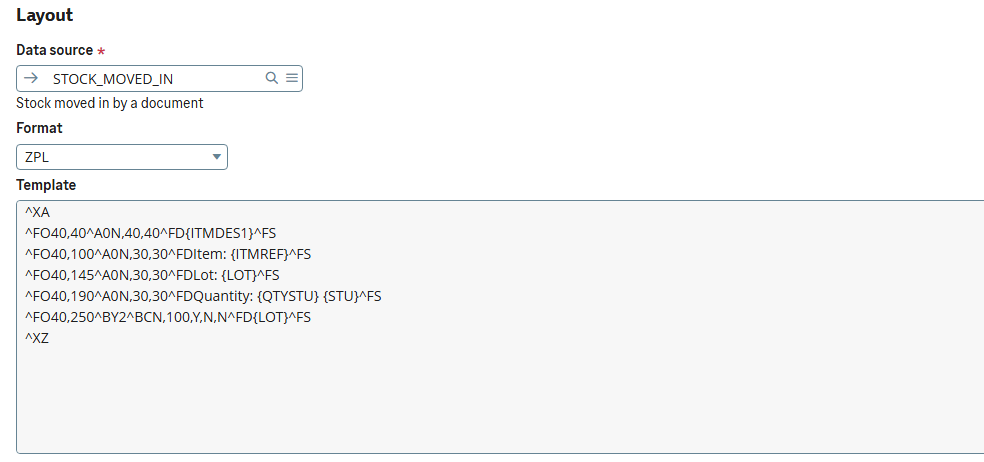
A label. A ZPL template whose tags X3’s fields fill.
In Sage X3 · our test data
A print job’s lines. Every print is logged; a wrong check digit stops its label before it reaches the printer.
In Sage X3 · our test dataWho it is for
Warehouse and production
Print from the receipt, the delivery or the work order, see the rows and copies first, and reprint any label from the log.
Consultants
Set up labels, their data, the documents they print from and the printers, in X3, without code.
IT
No print server of ours to run: labels go through BarTender or as files to your own queue, routed by rules.
What it does
- 01Print labels from purchase receipts, production tracking, quality control, work orders, deliveries, stock changes, lot renumbering and lot characteristics changes.
- 02Consultants set up what prints, from where and to which printer, without code. A ready setup ships to copy, with starter labels for lots, deliveries, work orders and SSCC.
- 03Labels are ZPL templates whose tags are filled from X3’s fields. Barcode data and check digits are checked before anything prints, and å, ä and ö print.
- 04Print through BarTender Cloud or a BarTender server, or as files for the customer’s own printer queue.
- 05Printer routing by site, user, label or a value on the document, and printing by itself when a document is saved, by hand, by an import or through a web service.
- 06SSCC numbers from X3’s own counter, with GS1’s check digit, and a web service for warehouse handhelds.
- 07Every print is logged, and a reprint sends the label exactly as it was first printed.
What it needs
- Sage X3 V12, 2025 R2 or 2026 R1, with Stock and Purchasing in use.
- Printers that take ZPL, such as Zebra’s, reached through BarTender or the customer’s own queue script.
Not in the first version
- Labels do not print straight to an X3 printer: they go through BarTender or the customer’s queue script.
- The preview shows a row’s values and the ZPL as text, not a picture of the label.
- Labels print from the documents that ship; others, such as the item master, are not supported yet.
Questions
Which printers does it support?
Printers that take ZPL, such as Zebra’s, reached through BarTender or through your own print queue.
Do we need BarTender?
No. Labels can be written as files for your own queue script. If you already use BarTender, Cloud or a server on premises, it prints through it.
Can labels print by themselves?
Yes, when a supported document is saved, on screen, by an import or through a web service, switched on per site or company and per label.
Can we see the label while we design it?
Open designer on a label opens a web label viewer in the browser. The template goes there, never a row’s values.
The other add-ons
- XNQEE-signatureSignatures and approvals on the changes that matter in X3, each sealed in a register that shows any tampering.
- XNQDData HealthEvery night, 22 checks of your X3 data, each finding with its owner and the function where it is fixed.
- XNQIE-invoicingEvery posted customer invoice leaves X3 as a checked PEPPOL invoice, with its PDF inside.
- XNQUUpgradeWhich of a customer’s customizations the next release breaks, before anything is upgraded.
See how it works in X3.
A 30-minute demo in our X3, in Swedish or English.
Book a demo