Nortiqo Data Health Your X3 data, checked every night.
Each morning the people who own the data see what is incomplete, inconsistent, wrong or stuck, each finding with its value, its owner and the X3 function where it is fixed.
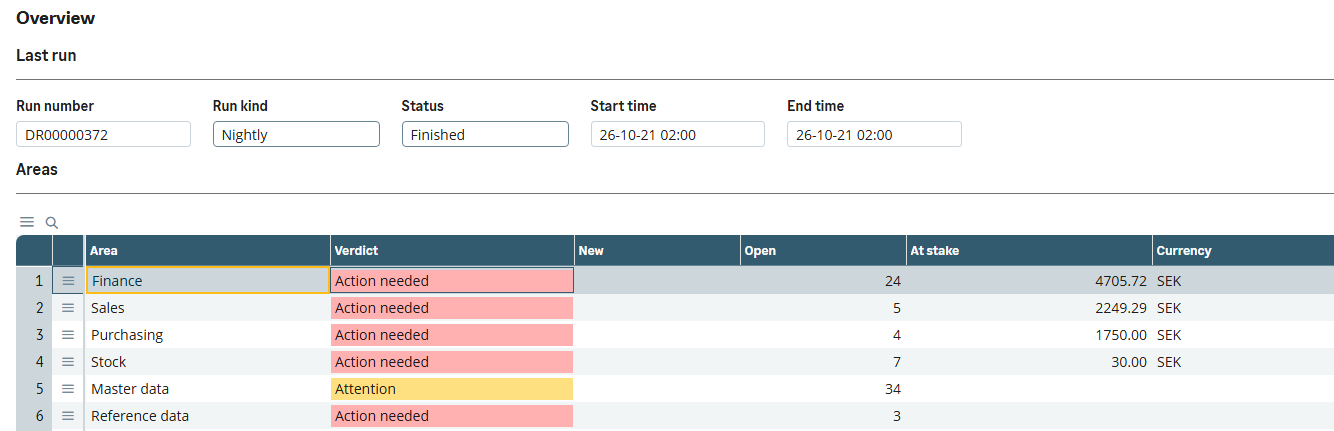
Last night’s run. Each area’s verdict, its findings and the money at stake.
In Sage X3 · our test dataX3 holds the signals. Nobody reads them together.
Unposted invoices, stock that disagrees with itself and suppliers sharing a bank account hide in a dozen menus and logs until the close finds them. Nortiqo Data Health reads the folder every night and shows the people who own the data what needs fixing, what it is worth and where it is fixed.
How it works
- 01
Read
A nightly run, or one on demand, reads the folder’s business data with 22 checks.
- 02
See
The board shows each area’s verdict, its new findings, the money at stake and its top finding.
- 03
Fix
A finding opens its record in Sage’s own function, where it is fixed.
- 04
Follow
The next run closes what it no longer finds, and brings back what returns.
Among the 22 checks
- Sales invoices not posted
- Purchase invoices not validated
- Journal entries still temporary
- Periods left open behind the current one
- Deliveries and receipts not invoiced
- Possible duplicate supplier invoices
- Negative or over-allocated stock
- Expired lots still in stock
- Stock counts left open
- Partners sharing a VAT number or bank account
- Invalid VAT numbers, IBANs and email addresses
- Products missing a weight or a cost
It reads and reports, and never changes data: every fix is made in Sage’s own function.
In X3
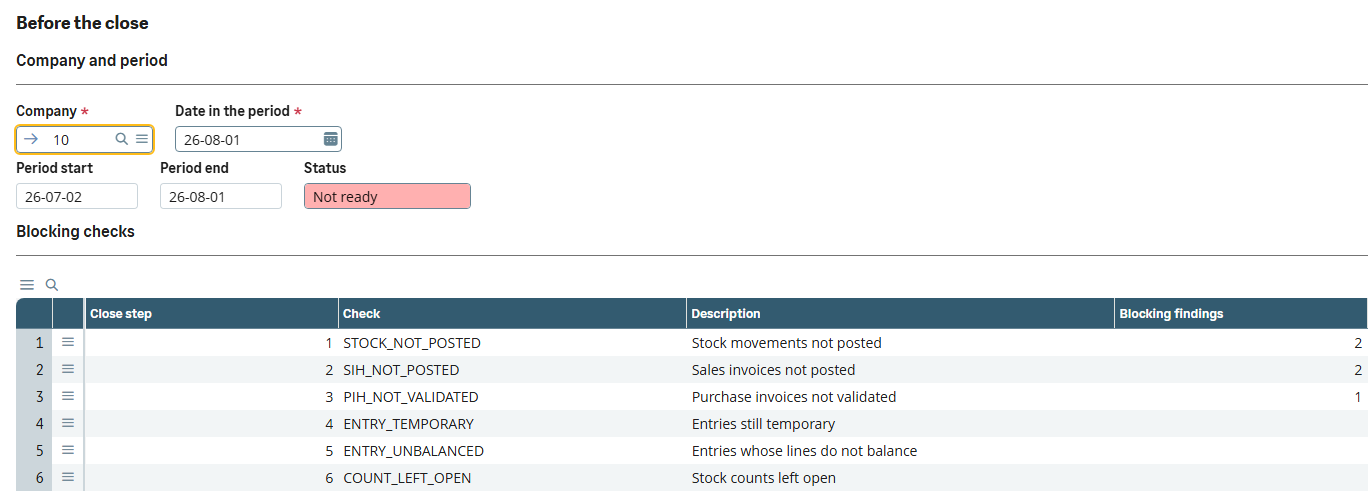
Close readiness. What blocks the close for a company and period, in the order it is cleared.
In Sage X3 · our test dataWho it is for
Finance
What blocks the close for a company and a period, with its value, in the order it is cleared.
Sales, purchasing and the warehouse
Their own findings each morning, each one opening its record in Sage’s own function.
Partners
The same findings in the customer’s X3, instead of ten questions before a review.
What it does
- 0122 checks across finance, sales, purchasing, stock and master data: invoices not posted, deliveries not invoiced, negative stock, possible duplicate supplier invoices, invalid VAT numbers and IBANs, and more.
- 02A board with one line per area: its verdict, its new findings, the money at stake and its top finding.
- 03Findings follow themselves: new, open or worse, and closed by the next run once fixed.
- 04Each finding opens its record in Sage’s own function.
- 05Close readiness: for a company and a period, what blocks the close, in the order it is cleared.
- 06Thresholds, owners, companies and sites set for each check, without code.
- 07Users see the findings of the sites their function profile gives them.
What it needs
- Sage X3 V12, 2025 R2 or 2026 R1.
- The batch server, for the nightly run.
Not in the first version
- It reads and reports; it never changes data. Every fix is made in Sage’s own function.
- The 22 checks that ship can be tuned or turned off, not added to.
- It watches the data, not the servers, services or licences.
Questions
Does it change our data?
Never. It only reads Sage’s tables. Every fix is made in Sage’s own function.
Can we add our own checks?
Not in the first version. Each of the 22 checks can be tuned, given an owner, limited to companies and sites, or turned off.
Does it watch our servers?
No. It watches the data, not the batch server, services, licences or disk space.
Who sees which findings?
Users see the findings of the sites their function profile gives them, as Sage’s own inquiries do.
The other add-ons
- XNQEE-signatureSignatures and approvals on the changes that matter in X3, each sealed in a register that shows any tampering.
- XNQLLabelsPrint labels from the document you are in, with barcodes checked before they print and every print logged.
- XNQIE-invoicingEvery posted customer invoice leaves X3 as a checked PEPPOL invoice, with its PDF inside.
- XNQUUpgradeWhich of a customer’s customizations the next release breaks, before anything is upgraded.
See how it works in X3.
A 30-minute demo in our X3, in Swedish or English.
Book a demo