Built inside Sage X3. Nothing to run beside it.
Nortiqo makes add-ons for Sage X3, each a product of its own. Take the one you need: it installs as one standard X3 patch and works with X3’s own users, menus and rights.
The add-ons
Each with its own page and its own patch. Open one to see it in X3.
XNQEE-signatureFinance · Production · QualitySignatures and approvals on the changes that matter in X3, each sealed in a register that shows any tampering.
- 01
You decide what needs a signature
A policy names the object, the events, the fields and the steps in order, set up without code.
- 02
Nothing changes until it is signed
With a change request, nothing is saved until every approver has signed. Then Sage’s own import applies it.
- 03
Proof that holds
Every signature is sealed with the company’s certificate and chained to the one before. A daily monitor lists any change no signature explains.
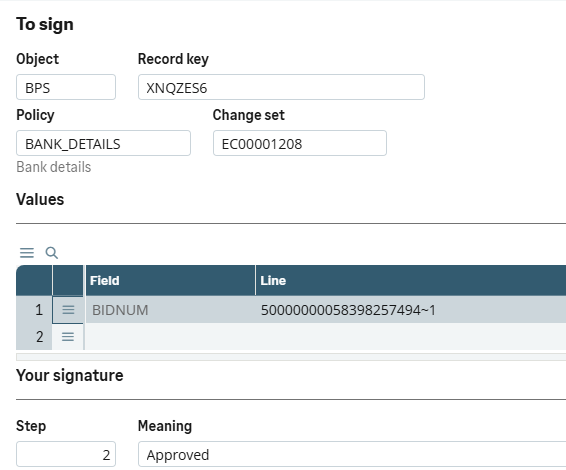
The signing dialog, at step 2 · In Sage X3 · our test data Fifteen ready-made policies, switched on as shipped
- Supplier bank details
- Customer credit limits
- A new customer’s activation
- A journal entry’s finalisation
- Price lists
- A product-site’s suppliers
- Bills of material
- Routings
- Products’ specifications
- Batch release
- Lot status
- Lot characteristics changes
- Miscellaneous issues
- Miscellaneous receipts
- Intersite transfers
For life science: a Regulated switch for FDA 21 CFR Part 11 and EU GMP Annex 11, and a validation pack.
- 01
XNQLLabelsWarehouse · ProductionPrint labels from the document you are in, with barcodes checked before they print and every print logged.
- 01
Print where the work is
From the receipt, delivery or work order you have open, or by itself when the document is saved.
- 02
Checked before it prints
Barcode data and check digits are checked before anything prints, and å, ä and ö print.
- 03
Every label on record
Every print is logged line by line, and a reprint sends the label exactly as it was first printed.
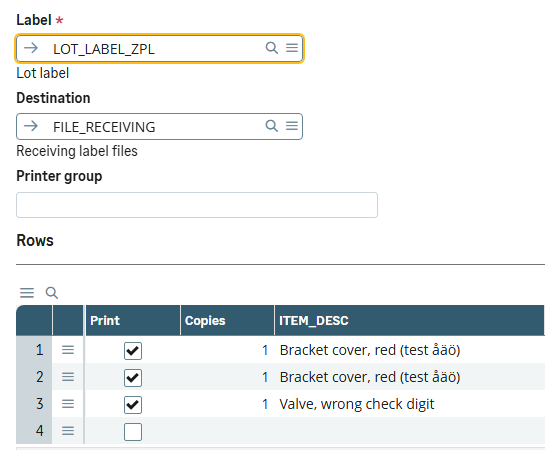
Label printing from a purchase receipt · In Sage X3 · our test data Prints from
- Purchase receipts
- Production tracking
- Quality control
- Work orders
- Deliveries
- Stock changes
- Lot renumbering
- Lot characteristics changes
Through BarTender Cloud, a BarTender server, or as files for your own printer queue. Set up in X3 without code, with a ready setup to copy.
- 01
XNQDData HealthFinance · Sales · Purchasing · StockEvery night, 22 checks of your X3 data, each finding with its owner and the function where it is fixed.
- 01
A board for the morning
One line per area: its verdict, its new findings, the money at stake and its top finding.
- 02
Findings that follow themselves
New, open or worse, and closed by the next run once fixed. Each opens its record in Sage’s own function.
- 03
Ready for the close
For a company and a period, what blocks the close, in the order it is cleared.
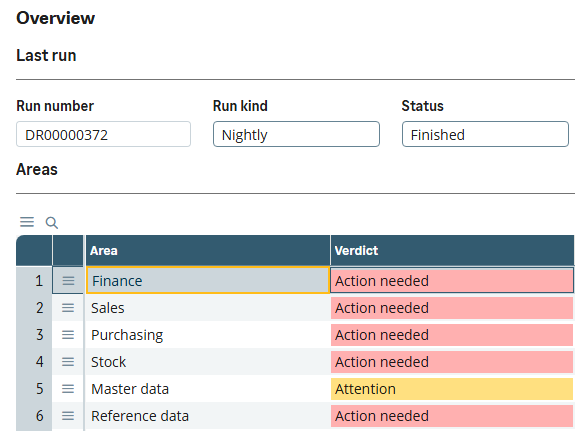
Last night’s run · In Sage X3 · our test data Among the 22 checks
- Sales invoices not posted
- Purchase invoices not validated
- Journal entries still temporary
- Periods left open behind the current one
- Deliveries and receipts not invoiced
- Possible duplicate supplier invoices
- Negative or over-allocated stock
- Expired lots still in stock
- Stock counts left open
- Partners sharing a VAT number or bank account
- Invalid VAT numbers, IBANs and email addresses
- Products missing a weight or a cost
It reads and reports, and never changes data: every fix is made in Sage’s own function.
- 01
XNQIE-invoicingFinanceEvery posted customer invoice leaves X3 as a checked PEPPOL invoice, with its PDF inside.
- 01
Checked before it goes
Against EN 16931, PEPPOL and Sweden’s national rules. Each finding names the record to fix.
- 02
Its own PDF inside
From your own invoice report in X3, with the attachments the setup names.
- 03
Every invoice in one monitor
Waiting, stopped, sent and failed, with the ones that need someone first.
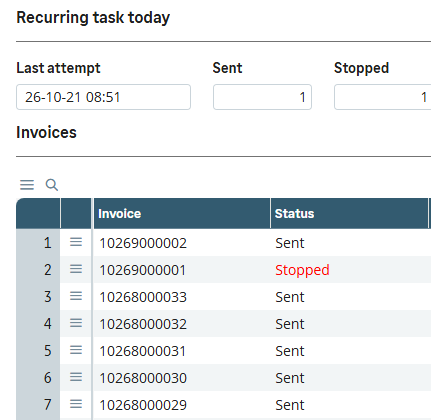
The E-invoices monitor · In Sage X3 · our test data What it sends
- Sales invoices
- Credit notes
- Invoices of accounts receivable
As PEPPOL BIS Billing 3.0, by SFTP to an operator such as InExchange every five minutes; no invoice goes twice. A readiness check reads the folder and proposes the company’s setup.
- 01
XNQUUpgradeSage partnersWhich of a customer’s customizations the next release breaks, before anything is upgraded.
- 01
Before anything is upgraded
A fingerprint file of facts, never code, is taken to a reference folder at the new release.
- 02
A verdict for everything it relies on
Every dependency of every customization, judged against the new release.
- 03
The findings are the task list
A status on every line, with who set it and when. After the test upgrade, a second run confirms the work.
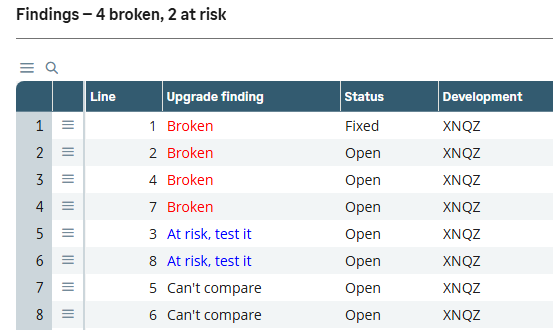
Upgrade findings · In Sage X3 · our test data Each dependency is judged
- Broken
- At risk
- Unaffected
- Can’t compare
A readiness score from 0 to 100 against Sage’s update-ready rules, with every point behind it listed. It reads Sage’s elements and never changes them.
- 01
More add-ons are on the way.
Inside X3, not beside it
One patch, nothing beside it
Installed through X3’s own patch integration. No server, service or connector to keep running.
Where users already work
Sign, print and check from the X3 functions people use every day. The setup lives in X3 too.
Swedish and English
Every screen, message and help page in both languages.
For Sage partners
Add-ons your customers can take without new infrastructure. You keep the customer; we deliver the product and its help in Swedish and English, and stand behind it.
Talk to us about partneringSee how it works in X3.
A 30-minute demo in our X3, in Swedish or English.
Book a demo